
To use AI to improve engagement on your webpages, have scripts add the four things readers stay for: a spoken version with read along, a five question quiz tied to the sections, one chart drawn from the page’s own numbers, and one tool they can use.
Listen to this article, about 12 minutes. A synthetic voice reads the article and announces each section title as it begins; tables are read row by row and the questions at the end are left out.
Recorded 25 September 2026 from the article as published that day. Press a chapter to jump there; the highlighted line is what is playing. A play button sits beside every section heading, and once you scroll past this player a bar at the bottom of the screen keeps the controls in reach. Tap or click any sentence to hear the reading start from there.
On this page: Google’s own definition of an engaged session, the two reports with data sets behind them (17 million plays, 8.96 billion quiz data points), and the four page elements built from them: audio with read along, a quiz, a chart and a tool.
Think you already know this? Five questions, one minute.
Every answer is on this page. Answer from what you know now; the page fills in the rest.
-
1. Which of these makes Google Analytics count a session as engaged?
Google’s own definition: an engaged session lasts longer than 10 seconds, has a key event, or has two or more page views, and engagement time counts only while the page is the tab in focus. Read the section
-
2. In the BeyondWords report on 17 million plays, how long did the average listen last?
The BeyondWords Audio Engagement Report, published in January 2023, puts the average listen at 3 minutes 45 seconds, 59 percent of playback, with 4.19 percent of visitors pressing play. Read the section
-
3. Why do getAIwork’s pages record one sentence per request?
Google’s Chirp 3 HD page lists the SSML elements these voices support and mark is not among them, so the read along is timed from the length of each sentence clip. The price is the same either way. Read the section
-
4. What does Riddle’s 2025 report give as the average time on a quiz against a standard article?
Riddle’s 2025 Quiz Marketing Report, from 8.96 billion data points on its own platform, reports 2 minutes 48 seconds on a quiz against 54 seconds on an article, with 73.4 percent of starts reaching the result. It is vendor data, so read it as a ceiling. Read the section
-
5. What does the description file for a page’s blocks have to name?
One short file carries the questions with their sources, the chart’s numbers and the tool; a script validates it, draws the chart and writes the three blocks into the page beside the sections they belong to. Read the section
What does engagement actually measure?
Google Analytics counts a session as engaged when it lasts longer than 10 seconds, has a key event, or has two or more page views, and it counts engagement time only while your page is the tab in focus, as its definition of user engagement spells out. A visitor who opens your article, switches tabs and forgets about it contributes nothing. That is the metric this page is about: seconds with the page in front of a person.
The reason engagement time runs short is that people do not read webpages, they scan them. Kate Moran’s eyetracking review for Nielsen Norman Group found that reading a whole page, or even most of it, is extremely rare; eyes jump between headings, bold words and the first lines of paragraphs. So the job is not to make people read more. It is to give a scanner a reason to stay and a listener a way to stay without reading at all.
Why does a spoken version keep people on the page longer?
Because listening is the one way to take in a long page without doing the work of reading it. The BeyondWords Audio Engagement Report, published in January 2023 from 17 million plays through its player, puts the average listen at 3 minutes 45 seconds, 59 percent of the file, with 58 percent of listens on phones. Only 4.19 percent of visitors pressed play, which is the honest half of the statistic: audio changes the behaviour of a minority, and it changes it a lot.
Two practitioner pieces prompted this article. Speechactors reports bounce rates falling by up to 20 percent and a media site gaining 22 percent time on page after adding text to speech, attributing the first figure to a SEMrush study it does not link, and Jordin Brouwer’s guide makes the case for reach, voice search and dwell time without citing a study at all. Both are worth reading for their tips on writing for the ear: short sentences, headings, conversational phrasing, a transcript beside the player. Treat their percentages as claims. The BeyondWords figure is the one with a data set behind it.
One thing audio will not do is earn you a rich result. Google’s speakable markup is in beta, limited to news publishers, and used by Google Home devices in the United States. What a recording can carry is an AudioObject schema describing the file, its duration and its chapters. Ours carries one. It earns nothing today, and we added it because it is the truthful description of what is on the page.
How do you build the audio with AI for under 40 cents a page?
Google Cloud Text to Speech has a tier for every budget, and the prices are public. The figures below are as listed on its pricing page on 24 September 2026, with spaces counted as characters; the last column is the arithmetic for a 13,000 character article, which is the average across our pages once the quiz, the FAQ and the captions are left out.
| Voice tier | Price per million characters | Free each month | One 13,000 character article |
|---|---|---|---|
| Standard | $4 | 4 million | about 5 cents |
| WaveNet | $4 | 4 million | about 5 cents |
| Neural2 | $16 | 1 million | about 21 cents |
| Chirp 3 HD | $30 | 1 million | about 39 cents |
| Studio | $160 | 1 million | about $2.10 |
getAIwork uses Chirp 3 HD, one voice chosen to match the byline. The script builds a spoken version of the page rather than reading the HTML: it opens every section by speaking its heading, reads tables row by row against their header, and leaves out the FAQ, the captions and the quiz. It records one sentence per request and keeps every clip under a name made from the words it speaks. Google’s supported SSML list for these voices has no mark element, so the length of each clip is the only exact timing there is. A later edit re-records only the sentences that changed and stitches the file back together, so fixing one word costs a fraction of a cent.
The player is where the engagement happens. Under the answer paragraph sits a chapter list with a play button per heading, and another beside every heading in the body. Once the player scrolls out of view a small pill offers to listen; on play it becomes a bar at the foot of the screen with play, pause, the chapter, the time and a speed of 1x, 1.25x or 1.5x that the phone remembers. The sentence being spoken is highlighted and kept in view, unless the reader scrolled in the last two and a half seconds, in which case the page leaves them alone. Tapping any sentence starts the reading there.
What does a quiz do that a summary cannot?
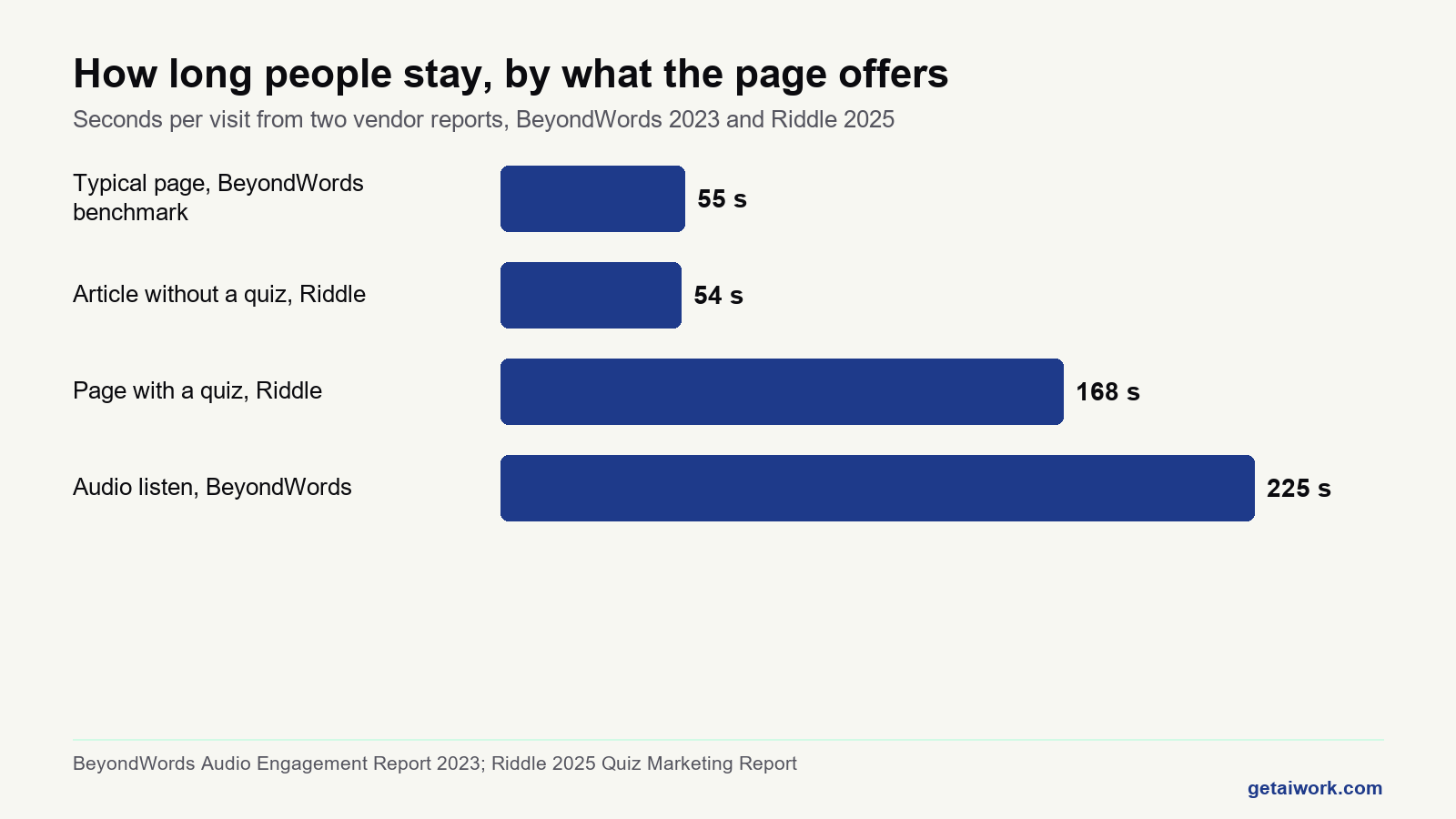
A summary tells a scanner what the page says. A quiz asks whether they got it, and a wrong answer is the moment a person actually reads a paragraph. Riddle’s 2025 Quiz Marketing Report, published in March 2026 from 8.96 billion data points over a year on its own platform, puts the average time on a quiz at 2 minutes 48 seconds against 54 seconds for a standard article, with 73.4 percent of starts reaching the result. It is vendor data about vendor customers, so read it as a ceiling rather than a promise; it still describes a behaviour worth borrowing.
Ours sits collapsed under the answer paragraph so it never gets in the way, and a second button at the end of the article offers it to the people who finished. Five questions, each tied to one section. A wrong answer shows a two sentence explanation with the source linked and a jump back to the section it came from. The result offers the starter kit by email and nothing else. On this site a question tests what a vendor’s own page or the board data says on a stated date, never anything about the reader’s own money. A quiz that flatters is a quiz nobody learns from.
If you would rather do AI work than build AI pipelines, the eight step match on getAIwork asks the questions in the other direction and shows which listings on the board fit your background.
When is a chart or a tool worth more than more words?
A scanner stops at a shape. The chart on each page is drawn by a script from numbers already in the article, a bar chart or a timeline, with the source in the caption and nothing decorative about it. When an article has no numbers worth drawing, it gets no chart, because a graph of nothing teaches a reader to skip graphs. The platforms page carries a timeline of the intake closures it documents, the Anthropic jobs page carries its postings by department, and this page carries the seconds from the two reports above.
The tool is the thing a reader takes away: a checklist whose ticks are saved on the reader’s own device, a chooser that restates the article’s table for the reader’s situation, or a log to fill in over a week. What a tool must never do here is project income, or anything a calculator could turn into a promise. There is no earnings calculator on getAIwork and there never will be, because the honest version prints “it depends” and the dishonest version is a compliance case with a payment processor.
The cheapest element of all is one sentence. Under the answer paragraph, a line beginning “On this page:” names what the page adds in its own terms: the dated count, the table compiled from primary sources, the accounts from people who did the thing. A scanner decides inside five seconds whether to stay, and that line is the five seconds.
Which element should your page get first?
Pick the sentence that describes the page. The answer restates the table on this page, nothing more.
Every option is a page element described in the table above; none of them promises a number for your site.
How do you add all of this to a page without a team?
With scripts that read the page and write the blocks, so a person only decides what goes in. A short description file names the five quiz questions with their sources, the numbers the chart draws, and the checklist or chooser. One script validates it, draws the chart, and writes the quiz, the chart and the tool into the page beside the sections they belong to, as plain HTML and JavaScript inside the post, so they run on an ordinary shared host with no plugin. A second script builds the spoken version, records it one sentence at a time, keeps the clips, uploads the file and inserts the player with its chapter index. A third fetches the live page and checks that the schema parses, the scripts run and every source still resolves. Adding all four to an existing page takes a few minutes of machine time and costs about 40 cents, nearly all of it the voice.
| Element | What it adds | Cost per article | Evidence, with its source |
|---|---|---|---|
| Audio with read along | A way to stay without reading | About 39 cents on Chirp 3 HD | 3:45 average listen, BeyondWords, 17 million plays |
| Five question quiz | A reason to reread one paragraph | Nothing, a script | 2:48 on a quiz against 54 s on an article, Riddle |
| Built chart | A shape a scanner stops at | Nothing, drawn locally | Scanning patterns, Nielsen Norman Group |
| Checklist or chooser | Something to take away | Nothing, a script | No published figure; count your own events |
| Three planned photos | A page that reads as made for it | About 21 cents | Contact sheet review, no figure claimed |
The engagement build, one page at a time
The ten things a finished page carries on getAIwork, in the order they go in. Tick them off for a page of your own.
Ticks are saved on this device only. A page can carry all ten and still be dull; the list is the floor, not the ceiling.
What if you want to do AI work rather than build AI pipelines?
Most people reading this do not want to build audio pipelines for a living. They want to get AI to work for them in the job they already have, or to find AI work they can be paid for. That is what getAIwork teaches, and since it is my own product, read the next paragraph as the pitch it is.
Learn: twenty minute daily lessons on getting AI to work for you, prompting, checking and delivering, built by someone whose AI scans thousands of job posts a week and still has a human approve every one. Prove: a certificate graded on real projects, not a multiple choice recap that no employer asked for. Earn: the work board, which is free and public with no signup, held 1,646 live listings on 25 September 2026, 263 of them marked beginner, every one screened by a person after my scanner. Pay on the board is shown only as the poster listed it, and nothing here is a promise of earnings.

Answer eight questions and the page shows which of those listings fit your background, then what to learn first to be ready for them.
If you came here for the engineering rather than the work, the guide to learning AI is the plain route in, and the platforms page shows every block described above running on a page you can press.
Frequently asked questions
Does adding audio to a page help it rank on Google?
Not directly, and nobody should tell you otherwise. Google’s speakable markup is a beta limited to news publishers, and engagement time is a measure of readers, not a documented ranking input. Audio earns its place by keeping the minority who press play on the page for minutes rather than seconds, and by serving people who cannot read the page at all.
What happens to the read along on a phone?
The same as on a laptop. The sentence being spoken is highlighted and kept in view, the bar at the foot of the screen carries play, pause, the chapter and the speed, and a tap on any sentence starts the reading there. If the reader scrolls away the page stops following for a few seconds and then resumes.
Do you need a developer to add these blocks to a page?
You need someone to set the scripts up once. After that a short description of the quiz, the chart and the tool is all a page needs, and a script turns it into plain HTML and JavaScript inside the post. Nothing runs on the server, no plugin is installed, and a shared WordPress host carries it without complaint.
How much does it cost to add all four to a page?
In API fees, under a dollar. The recording is about 39 cents on Chirp 3 HD for a 13,000 character page once the free million characters each month are used, three generated images are about 7 cents each, and the chart and the blocks cost nothing because they are drawn and written locally.
Is machine narration acceptable for accessibility?
It is an addition, not a substitute. The written page stays the primary version, the audio is described by an AudioObject schema, and a screen reader user keeps every heading, table and link exactly as before. What the recording adds is a way for anyone to take the page in without reading it, at a speed they choose.
Which AI models does getAIwork use for this?
Google Cloud Text to Speech supplies the Chirp 3 HD voice, recorded one sentence at a time so the page can highlight each sentence as it is spoken and a later edit re-records only the sentences that changed. A Gemini image model renders the three photographs from written briefs. The quiz, the chart and the tools are plain HTML and JavaScript written by a script from a short description file, with no model involved at all.
Finished the page? The same five questions from the top, to see what stuck.
Platform statuses and listed pay change without notice. Pay figures are quoted only as listed by the poster on the date shown and are never a promise of earnings. This page was verified on the date shown and is rechecked on the weekly refresh.